You've probably heard all about the privacy concerns and conspiracy theories related to why Apple has been tracking your location data--or at least storing it. The news broke in recent weeks, thanks almost entirely to a couple of researchers who created a little app that interpreted the data hidden away and synchronized through iTunes to your computer.
Using the simple little app they created (read all about it here), I decided to show those who are curious how it works by giving you more than just a simple screen shot of the resulting map that you may have seen posted around the internet.
Here it is, complete with my commentary:
I should mention that there is no evidence that this was ever sent back to Apple, and further, knowledge of the existence of this file is not new information!
Fellow iPhone users, do you feel as though your privacy has been violated?

Showing posts with label Apple. Show all posts
Showing posts with label Apple. Show all posts
Monday, May 09, 2011
Tuesday, January 06, 2009
Tuesday, April 01, 2008
Plaxo solves my sync issues
If you have multiple computers in several locations, and portable "smart" devices that carry a lot of the same information as your computers, you'll drive yourself crazy trying to keep the data on all devices current.
Keeping my data current has been an ongoing quest for me since working on a Windows PC at home and a Mac at work. At first it didn't matter much to me. Then I saw how valuable keeping mailboxes synchronized could be. Soon bookmarks became an issue. For a while, I would export my bookmarks from my work computer by html to a zip(!) drive, carry it home, import it into my home browser.
Over the years, my expectations have grown regarding keeping my devices in sync. My device quantity has grown as well. I currently work from a PowerBook G4, a desktop G5, a Windows XP P4, and now, thanks to my dad off-loading his Treo, a Windows Mobile device.
I have already written about the value of using the Google Browser Sync plugin for Firefox. This not only uses your existing Google account to keep your bookmarks synchronized across however many computers you want, it also will sync your history, cache, and site logins and passwords. This is very handy!
I also sychronize my Mac iCal data with my Google calendar using Spanning Sync. This allows me to update shared calendars that are shared with our staff, published publicly for our volunteers to see, and personal family calendars with my wife.
Further, my iCal, Address Book, Yojimbo, Mail settings, Transmit Favorites, Notes, Dashboard Widgets, and Keychains between my two Macs are synchronized through .Mac.
All this synchronizing is a delicate balance to maintain. One innocent failure and entire calendars are duplicated, erased, or corrupted in some other way. The problem to date has been the Treo. Windows Mobile does not make any software to synchronize data with Macs. Third party apps I have tried (three to be exact) have failed miserably to sync to Windows Mobile.
I don't care about my calendar or bookmarks syncing. All I care about is my contact list. I just want to see that show up on my phone and then when I make an edit on my phone, see it reflected back into my address book on my computer(s).
After trying yet another attempt at syncing with a third party app, I decided it wasn't meant to be. I seriously began considering the iPhone. (But I'm with Sprint!)
So PLAXO steps in. A bizarre web site that syncs all of your social web apps: blogger, facebook, flickr, twitter, even Amazon wish lists and puts them into one place. It also synchronizes your calendar (perfectly, I might add) AND your contact list. This wasn't important to me, and frankly scared me a little bit when I pushed the sync button the first time (what if it disrupted my perfect little world of sync harmony?), but I like to try new gadgets and services, and couldn't resist. I pushed the "go" button.
I'm glad I did! It worked perfectly, and continues to work with no troubles. Then I discovered this little sync tab on their site that included all these other services--including Windows Mobile. Really? I thought. Since it worked so well with my Mac, I thought I'd try it. So I took my Treo cradle home, put it on my home computer, found my copy of Office 2003, installed Outlook, downloaded the updates to outlook, and ....success! I now have two-way syncing from my phone to my Address Book in a very unusual way.
Track this "signal path" for adding a new contact to my Address Book beginning with my desktop at church:
Desktop -->thru .Mac --> Laptop
Laptop --> thru Plaxo --> Outlook on PC at home
Outlook --> sync services --> Treo
The cool thing about it is that if I make an edit or a change on my phone, I can stick it in the cradle, and within 30 seconds, my laptop is updated with the new data. I feel like in some ways the whole thing is a hack, a huge bandaid that really only partially works, because it only synchronizes my contacts, (so far) nothing else.
However, if you are not on Plaxo, I would recommend checking it out--even if you only use the sync services.
Keeping my data current has been an ongoing quest for me since working on a Windows PC at home and a Mac at work. At first it didn't matter much to me. Then I saw how valuable keeping mailboxes synchronized could be. Soon bookmarks became an issue. For a while, I would export my bookmarks from my work computer by html to a zip(!) drive, carry it home, import it into my home browser.
Over the years, my expectations have grown regarding keeping my devices in sync. My device quantity has grown as well. I currently work from a PowerBook G4, a desktop G5, a Windows XP P4, and now, thanks to my dad off-loading his Treo, a Windows Mobile device.
I have already written about the value of using the Google Browser Sync plugin for Firefox. This not only uses your existing Google account to keep your bookmarks synchronized across however many computers you want, it also will sync your history, cache, and site logins and passwords. This is very handy!
I also sychronize my Mac iCal data with my Google calendar using Spanning Sync. This allows me to update shared calendars that are shared with our staff, published publicly for our volunteers to see, and personal family calendars with my wife.
Further, my iCal, Address Book, Yojimbo, Mail settings, Transmit Favorites, Notes, Dashboard Widgets, and Keychains between my two Macs are synchronized through .Mac.
All this synchronizing is a delicate balance to maintain. One innocent failure and entire calendars are duplicated, erased, or corrupted in some other way. The problem to date has been the Treo. Windows Mobile does not make any software to synchronize data with Macs. Third party apps I have tried (three to be exact) have failed miserably to sync to Windows Mobile.
I don't care about my calendar or bookmarks syncing. All I care about is my contact list. I just want to see that show up on my phone and then when I make an edit on my phone, see it reflected back into my address book on my computer(s).
After trying yet another attempt at syncing with a third party app, I decided it wasn't meant to be. I seriously began considering the iPhone. (But I'm with Sprint!)
So PLAXO steps in. A bizarre web site that syncs all of your social web apps: blogger, facebook, flickr, twitter, even Amazon wish lists and puts them into one place. It also synchronizes your calendar (perfectly, I might add) AND your contact list. This wasn't important to me, and frankly scared me a little bit when I pushed the sync button the first time (what if it disrupted my perfect little world of sync harmony?), but I like to try new gadgets and services, and couldn't resist. I pushed the "go" button.
I'm glad I did! It worked perfectly, and continues to work with no troubles. Then I discovered this little sync tab on their site that included all these other services--including Windows Mobile. Really? I thought. Since it worked so well with my Mac, I thought I'd try it. So I took my Treo cradle home, put it on my home computer, found my copy of Office 2003, installed Outlook, downloaded the updates to outlook, and ....success! I now have two-way syncing from my phone to my Address Book in a very unusual way.
Track this "signal path" for adding a new contact to my Address Book beginning with my desktop at church:
Desktop -->thru .Mac --> Laptop
Laptop --> thru Plaxo --> Outlook on PC at home
Outlook --> sync services --> Treo
The cool thing about it is that if I make an edit or a change on my phone, I can stick it in the cradle, and within 30 seconds, my laptop is updated with the new data. I feel like in some ways the whole thing is a hack, a huge bandaid that really only partially works, because it only synchronizes my contacts, (so far) nothing else.
However, if you are not on Plaxo, I would recommend checking it out--even if you only use the sync services.


Monday, March 10, 2008
Wait, Wha.....?
 I created a little space by emptying my trash and didn't see this message the rest of the day, but that still doesn't make me feel much better...
Monday, January 28, 2008
Tooble - for Mac
If you've ever watched a video on YouTube and wished you had a way to keep it locally on your computer, let me introduce you to Tooble. This is a new freeware piece of software that I first heard about through this podcast.
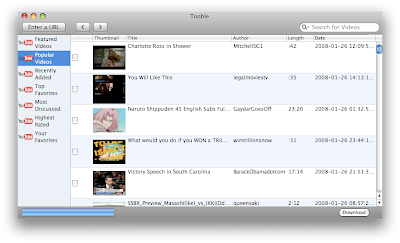
It has an integrated search engine, as well as it's own preset categories. Once you find what you want, put check marks by the videos and click download. It will then download and convert the Youtube streams into Quicktime files and if you want, it will even import the files directly into your iTunes movie folder. Enjoy!

It has an integrated search engine, as well as it's own preset categories. Once you find what you want, put check marks by the videos and click download. It will then download and convert the Youtube streams into Quicktime files and if you want, it will even import the files directly into your iTunes movie folder. Enjoy!
Thursday, January 17, 2008
I'm more better than you--evidently
From MacDailyNews, a study of some 7,500 Mac users suggest that Mac enthusiasts are "...more liberal, less modest, and more assured of their own superiority than the population at large." And, "...receptive to their own inner feelings and may feel both happiness and unhappiness more intensely than others."
Yup, that's me.
Yup, that's me.
Friday, January 11, 2008
More computer problems
Everything's back to normal. It's ok. This news is a couple weeks old. My laptop's hard drive died. This was not as big of a crisis as the home computer discussed in previous posts. The reasons for that are these:
- All my financial data is on my home computer. When that went down, I almost didn't know how to pay a bill, or even what money I had (not much, I assure you)
- I use iDisk. This is a really cool service through .Mac that keeps my data syncronized between my laptop and my desktop at work. All my finale files, word docs, pdf files, and everything are kept on an Apple server somewhere, plus the files are kept locally on my desktop hard drive and my laptop hard drive so I can work off line if I want to, then when I reconnect, the data is synchronized.
- I back up fairly regularly. I have been using SuperDuper for some time, though when I went to Leopard, it no longer functioned. I am now trying out Time Machine, however, which is very cool.
- I use the Google Browser Sync firefox extension. This is cool because any computer that I use keeps all of my bookmarks, passwords, cache, history, everything syncronized between my browsers. After installing Firefox on this machine, then installing that extension, all my settings came back and I was at home again.
- Applecare. I walked in to the Apple store, they tested the computer, determined the hard
 drive failed, and replaced my hard drive for "free." Plus my fold hard drive was discontinued for this model laptop and they had to replace it with the next model up. I went from 100GB to 120GB. Cool! If you have a Mac, Applecare is worth the extra bucks. I didn't have to do anything except tell them the machine doesn't work and they took care of it.

Tuesday, September 04, 2007
I Use Adium
There was a time, not too long ago when I first migrated to OS X (from OS 9--that was a long wait for me! but that's another story all together) that I signed up for iChat. At first I ignored it. I never used it. My reasons were simple. First, I resented being interrupted at any given moment by someone, anyone who sees me online. Second, there's the phone. There's email. There are cell phones. There were already a variety of ways to reach me. And of course, most compelling, the two people at the time with whom I would most likely share a chat were in the offices next to me. So why bother?
After moving to NC, I decided to resurrect iChat. I played with it for a while but soon discovered that some of my friends, litterally from all over the world, were on several different chat services. As it turned out, I unwittingly had accounts on many of these chat services already in place. I was an early adapter of ICQ, back in the dial up days.
I rarely used it. I have a Hotmail, Yahoo, Gmail, and AIM account (iChat works on AIM). How could I see if my friends were online without having to check all these different services?
Enter Adium. This is a great little program for MAC OS X. It combines all of your various chat accounts into one place. As you can see, you may access me from any one of these services below:

You can organize your contacts in various ways, by a custom-assigned buddy list, or by account. My list automatically resizes as people come and go. It lives in the bottom right hand corner of my screen. It may look like any of these windows at various times:


I've now decided that the reason I live with chat on so much has more to do with just knowing that I can reach someone quickly and easily. (Yes, I'll admit, email has become just too slow!). I've enjoyed the instant contact with someone who may be across the hall or half way around the world. Just like most chat clients, you can set away messages if you're busy, or sometimes, you just can't reply to someone right way--no different then not answering your phone just because someone calls.
For those of you wondering what the Windows equivalent of this program would be, I would suggest Trillian, though since I tried it last, it didn't compete with Adium's slickness.
Send me your chat address!
After moving to NC, I decided to resurrect iChat. I played with it for a while but soon discovered that some of my friends, litterally from all over the world, were on several different chat services. As it turned out, I unwittingly had accounts on many of these chat services already in place. I was an early adapter of ICQ, back in the dial up days.
I rarely used it. I have a Hotmail, Yahoo, Gmail, and AIM account (iChat works on AIM). How could I see if my friends were online without having to check all these different services?
Enter Adium. This is a great little program for MAC OS X. It combines all of your various chat accounts into one place. As you can see, you may access me from any one of these services below:

You can organize your contacts in various ways, by a custom-assigned buddy list, or by account. My list automatically resizes as people come and go. It lives in the bottom right hand corner of my screen. It may look like any of these windows at various times:


I've now decided that the reason I live with chat on so much has more to do with just knowing that I can reach someone quickly and easily. (Yes, I'll admit, email has become just too slow!). I've enjoyed the instant contact with someone who may be across the hall or half way around the world. Just like most chat clients, you can set away messages if you're busy, or sometimes, you just can't reply to someone right way--no different then not answering your phone just because someone calls.
For those of you wondering what the Windows equivalent of this program would be, I would suggest Trillian, though since I tried it last, it didn't compete with Adium's slickness.
Send me your chat address!
Sunday, July 22, 2007
Tension
I sometimes think about conflicting things in my life and wonder what it says about me and the direction of my family. I also wonder on a macro level about how these things affect our culture, and the future of our culture. It has been said that our post-modern times are fundamentally contradictory. We think the world is falling apart, yet we consume and waste like there's no tomorrow. Religion is down, but spirituality is up. We build huge homes, yet the typical family spends less and less time together in them. We buy in to all these time-saving devices, yet feel as though we've never been busier.
My tensions, or conflicts are many, but here are some related specifically to technology that I've been thinking about lately.
On the one hand, I want a huge 1080p HD television with a BluRay player and HD satellite or cable so I can enjoy and experience the best in modern home theater entertainment. On the other hand, I want to get rid of our 27 inch CRT because of the low priority I want to place on it and how, compared to the average family, how infrequently we watch it.
On the one hand, I want to subscribe to cable or satellite service that delivers a million channels, especially the ones I know I enjoy, History channel, ESPN, Discovery, and so on, mostly so that I can spend my time flipping through all my options, not necessarily settling on one thing to watch. On the other hand, I need to be content with my life line cable, the major networks, a couple of Spanish channels, some PBS, WGN and TNT. Oh, and CPAN 2, for some reason. Why pay the money for all those extra channels if we're trying so hard to de-emphasize TV in our family?
On the one hand, I want an iPhone. Those things look so cool! On the other hand, I want to get rid of my cell phone. Not because I dislike it, but because let's face it, do I really NEED a cell phone? I pay Sprint $68/month so that people can reach me nearly on demand; yet I have email, voice mail at home and voice mail at work. I'm not THAT important!
On the one hand, I should dump MLB. It's a commitment. I've replaced the vacuum created by hardly watching TV with baseball. But for some reason I enjoy it so much. On the other hand...um, I enjoy it so much!
One the one hand, I should dump my online Blockbuster subscription. What a crazy thing it is to devalue TV/Cable/Satellite, think I'm clever because I'm not spending extra money on all those channels but then get movies I sometimes don't care about in the mail. And then I watch them! I should read a book! On the other hand, I enjoy movies. I like being caught up on what's being produced. I like the story telling, the art, even-- the production of movies. I enjoy a story, of just about any subject, told well.
As I type this I am becoming aware that what I'm dealing with is not a conflict of interests, but a conflict of values. I do value gadgets. I don't know why. I guess I also value the art of movies, the drama (though not all see it that way) of baseball.
I have not settled on where the moderate level of all these things would be. I jump in to a thing and soak it all up sometimes, even if it means just soaking it up on the periphery. I am not sure I have arrived at priorities. I mean, beyond the very important things of God, my wife, and my kids, these other things must descend in some meaningful way from there. I am uneasy or, uncertain, anyway, about how all this should balance in my life.
My tensions, or conflicts are many, but here are some related specifically to technology that I've been thinking about lately.
On the one hand, I want a huge 1080p HD television with a BluRay player and HD satellite or cable so I can enjoy and experience the best in modern home theater entertainment. On the other hand, I want to get rid of our 27 inch CRT because of the low priority I want to place on it and how, compared to the average family, how infrequently we watch it.
On the one hand, I want to subscribe to cable or satellite service that delivers a million channels, especially the ones I know I enjoy, History channel, ESPN, Discovery, and so on, mostly so that I can spend my time flipping through all my options, not necessarily settling on one thing to watch. On the other hand, I need to be content with my life line cable, the major networks, a couple of Spanish channels, some PBS, WGN and TNT. Oh, and CPAN 2, for some reason. Why pay the money for all those extra channels if we're trying so hard to de-emphasize TV in our family?
On the one hand, I want an iPhone. Those things look so cool! On the other hand, I want to get rid of my cell phone. Not because I dislike it, but because let's face it, do I really NEED a cell phone? I pay Sprint $68/month so that people can reach me nearly on demand; yet I have email, voice mail at home and voice mail at work. I'm not THAT important!
On the one hand, I should dump MLB. It's a commitment. I've replaced the vacuum created by hardly watching TV with baseball. But for some reason I enjoy it so much. On the other hand...um, I enjoy it so much!
One the one hand, I should dump my online Blockbuster subscription. What a crazy thing it is to devalue TV/Cable/Satellite, think I'm clever because I'm not spending extra money on all those channels but then get movies I sometimes don't care about in the mail. And then I watch them! I should read a book! On the other hand, I enjoy movies. I like being caught up on what's being produced. I like the story telling, the art, even-- the production of movies. I enjoy a story, of just about any subject, told well.
As I type this I am becoming aware that what I'm dealing with is not a conflict of interests, but a conflict of values. I do value gadgets. I don't know why. I guess I also value the art of movies, the drama (though not all see it that way) of baseball.
I have not settled on where the moderate level of all these things would be. I jump in to a thing and soak it all up sometimes, even if it means just soaking it up on the periphery. I am not sure I have arrived at priorities. I mean, beyond the very important things of God, my wife, and my kids, these other things must descend in some meaningful way from there. I am uneasy or, uncertain, anyway, about how all this should balance in my life.
Saturday, April 21, 2007
I'm famous
Thanks to my friend Jason who pointed this out and sent this highlighted picture, I have learned that I appear on Apple's web site. How cool is that? This is a picture of Tim and me trying to connect to the internet in the "Apple Lounge." All we could do was connect to the router, but the internet was down. Dumb.
 Anyway, for those of you keeping score at home, this is my 100th post. Kind of pathetic since I've been running this for about a year and a half.
 Anyway, for those of you keeping score at home, this is my 100th post. Kind of pathetic since I've been running this for about a year and a half.
Wednesday, March 21, 2007
Feeling Prepared
This has not been my week.
I know--it's only Wednesday.
I walked into my office on Sunday morning to the sound of all five (or more?) fans on my G5 up at full speed. That is not a good sign. Usually this means the computer was reset for some reason--probably due to a power outage. Sure enough, there was a fire that effected several thousand people Friday night. All I remember seeing was a flicker, but I live on the other side of town.
Anyway, rebooting the computer did nothing. It gave me the usual Mac startup sound, but then nothing. Like it was stuck in neutral. No hard drive noise, no display at all. Nothing. I shut it down and tried it again, and again, and again.
On Monday I took it to the Mac store (thankfully just up the street) but the warranty had expired so to my surprise, the guy behind the desk suggested I try an authorized Apple tech in town that would save me some money over using the Apple repair.
So that's where I took it. They diagonised the issue as a faulty video card. I should have my computer tomorrow.
BUT--the thing that saved me was an external hard drive. Not just the hard drive but a little software program called SuperDuper. Months ago I set it to backup my internal hard drive. After making an initial backup of everything on the drive, every night around 11:00pm it backs up anything from the day that had changed or had been added. This keeps it very current and keeps the backup fairly short.
So, the very last chart I edited, pdf I ran off, mp3 I added on Thursday was backed up and available for me. All I had to do was plug the drive into my laptop and everything I needed was there.
The only thing I couldn't do was create charts. I didn't take the time to try to configure this computer for the midi and keyboard settings, plus, even though I had access to Finale, I could not use it to print or save since two instances of it had already been registered on two different computers.
So friends, take my advice, even though it appears my hard drive is ok, I've been without my computer all week, but not my data! It could have been a lot worse.
I know--it's only Wednesday.
I walked into my office on Sunday morning to the sound of all five (or more?) fans on my G5 up at full speed. That is not a good sign. Usually this means the computer was reset for some reason--probably due to a power outage. Sure enough, there was a fire that effected several thousand people Friday night. All I remember seeing was a flicker, but I live on the other side of town.
Anyway, rebooting the computer did nothing. It gave me the usual Mac startup sound, but then nothing. Like it was stuck in neutral. No hard drive noise, no display at all. Nothing. I shut it down and tried it again, and again, and again.
On Monday I took it to the Mac store (thankfully just up the street) but the warranty had expired so to my surprise, the guy behind the desk suggested I try an authorized Apple tech in town that would save me some money over using the Apple repair.
So that's where I took it. They diagonised the issue as a faulty video card. I should have my computer tomorrow.
BUT--the thing that saved me was an external hard drive. Not just the hard drive but a little software program called SuperDuper. Months ago I set it to backup my internal hard drive. After making an initial backup of everything on the drive, every night around 11:00pm it backs up anything from the day that had changed or had been added. This keeps it very current and keeps the backup fairly short.
So, the very last chart I edited, pdf I ran off, mp3 I added on Thursday was backed up and available for me. All I had to do was plug the drive into my laptop and everything I needed was there.
The only thing I couldn't do was create charts. I didn't take the time to try to configure this computer for the midi and keyboard settings, plus, even though I had access to Finale, I could not use it to print or save since two instances of it had already been registered on two different computers.
So friends, take my advice, even though it appears my hard drive is ok, I've been without my computer all week, but not my data! It could have been a lot worse.
Monday, February 27, 2006
Subscribe to:
Posts (Atom)